
Understanding the component version information available from the Black Duck KB
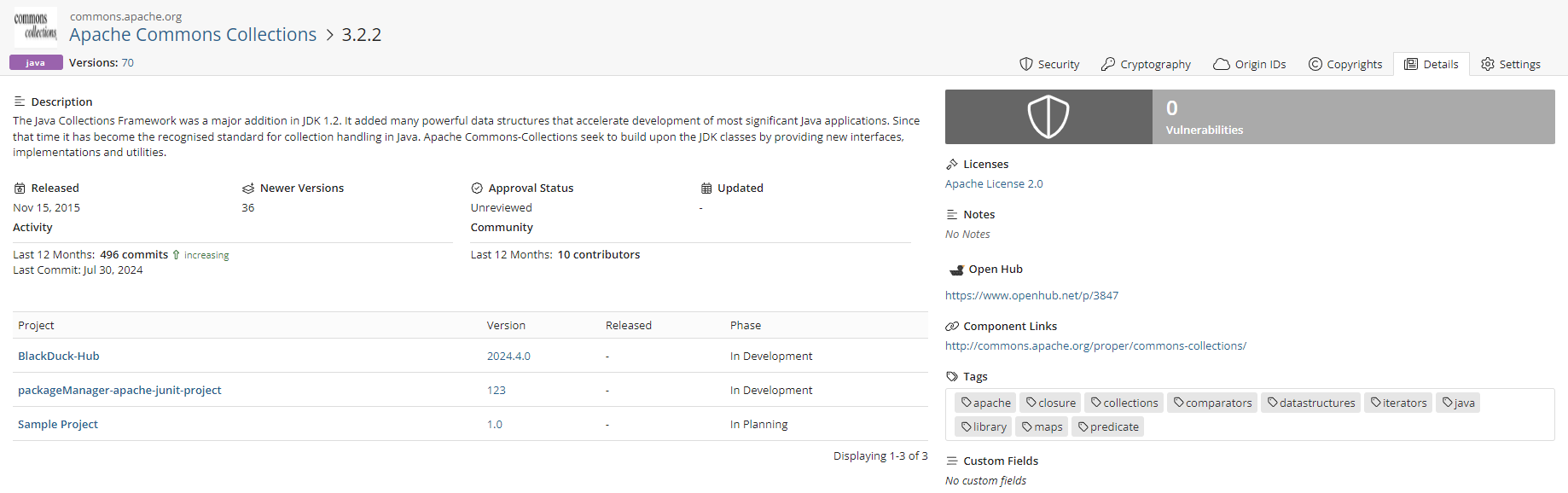
On the Component Name Version page, the Overview tab provides the following information:
-
Description: A brief summary of the component's purpose and functionality.
-
A Where Used table that lists the projects and respective versions in which this version of the component is used, excluding any Bills of Materials (BOMs) that contain the component if it has been marked as ignored.
-
Vulnerabilities: Count of vulnerabilities associated with this version.
-
Licenses: Information on the licenses that apply to this component.
-
Released: The date when this version was published.
-
Activity: Insights into commit activity and trends over the past 12 months.
-
Last 12 months: The number of commits.
-
Last Commit: This indicates the date of the most recent commit made to the component, providing insight into the latest updates or changes.
-
Contributors: The total number of contributors who have contributed to the component in the past year. This reflects the level of community involvement and support for the component.
-
Newer Versions: This section displays the number of newer versions that have been released since this version. It helps users understand if there are updates available that may include important features or security fixes.
-
-
Approval Status: Current Approval Status of this version.
-
Links: Links to the component resources, if available.
Expand the More Details link to see additional information:
-
Open Hub: Links to Open Hub, if available.
-
Notes: Any notes for this component version.
-
Tags: Relevant tags associated with the component, if available.
-
SBOM Fields: Details on Software Bill of Materials fields, if present.
-
Custom Fields: Any additional custom fields relevant to the component.
The table contains the following information:
| Column | Description |
|---|---|
| Project |
Name of the project that uses this version of the OSS component from Black Duck KB. Select the project name to display the Overview tab of the Project Name page which provides information on this project. |
| Version |
Version of the project that uses this version of the OSS component from Black Duck KB. Select the version to display the BOM filtered to display that component version. |
| Released | Date this version was released. |
| Phase | Development phase that this version of the project is currently in. |
On Black Duck KB Component Name Version page, the Vulnerabilities tab displays the list of vulnerabilities associated with this version of the OSS component from Black Duck KB.
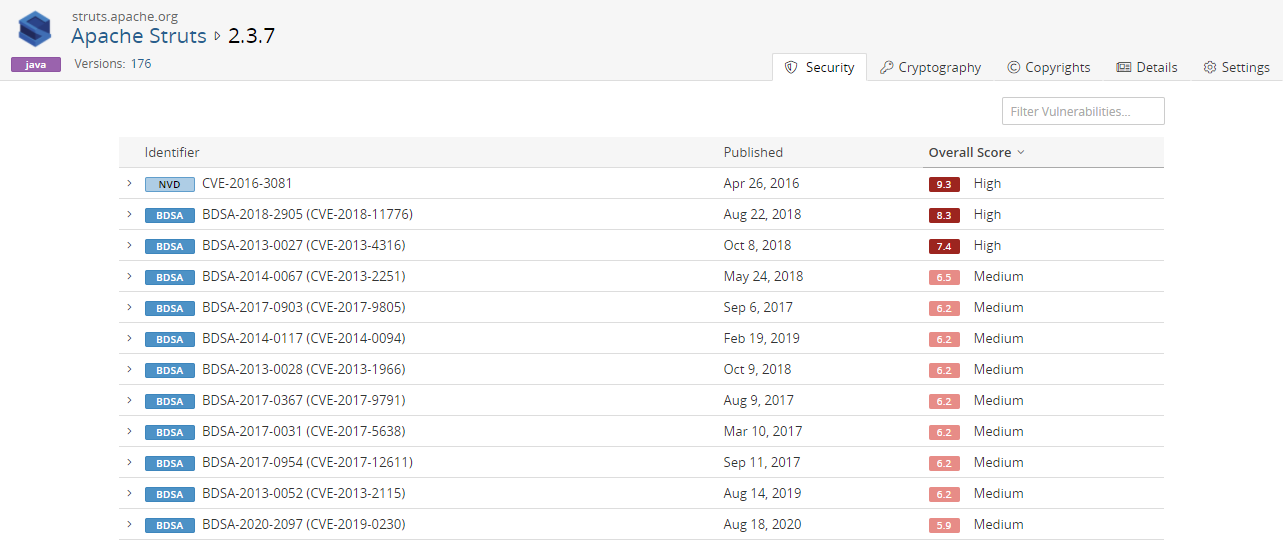
This tab contains the following information:
| Column | Description |
|---|---|
| Identifier |
The identifier and value associated with this vulnerability. Select > in the table next to the vulnerability to view a brief description. Depending on the identifier, select to view the BDSA record or the CVE record. |
| Published | Date on which the vulnerability was published. |
| Overall Score |
Shows the Temporal score (for BDSA), or Base score (for NVD) and associated risk level. Hover over the Overall Score value to see the individual values.
The Temporal score represents time-dependent qualities of a vulnerability, taking into account the confirmation of the technical details of a vulnerability, the existence of any patches or workarounds, and the availability of exploit code or techniques. The Base score reflects the overall basic characteristics of a vulnerability that are constant over time and user environments:
For more information, see the CVSS specification document section on Exploitablility Metrics. The Exploitability score measures how the vulnerability is accessed and if extra conditions are required to exploit it, taking into account access vector, complexity, and authentication. The Impact score reflects the possible impact of successfully exploiting the vulnerability, considering the integrity, availability, and confidentiality impacts. |
The Cryptography tab shows information on component versions that have encryption algorithms. Click here for more information. This tab will only appear if you have Cryptography enabled on your Product Registration key.
The Origin IDs tab lists all known external IDs and Package URLs (PURLs) associated with a specific component version.
The Copyrights tab shows the copyright statements for this component version. Click here for more information.
The Settings tab shows details on this component version. Information shown here also appears on the Overview tab.
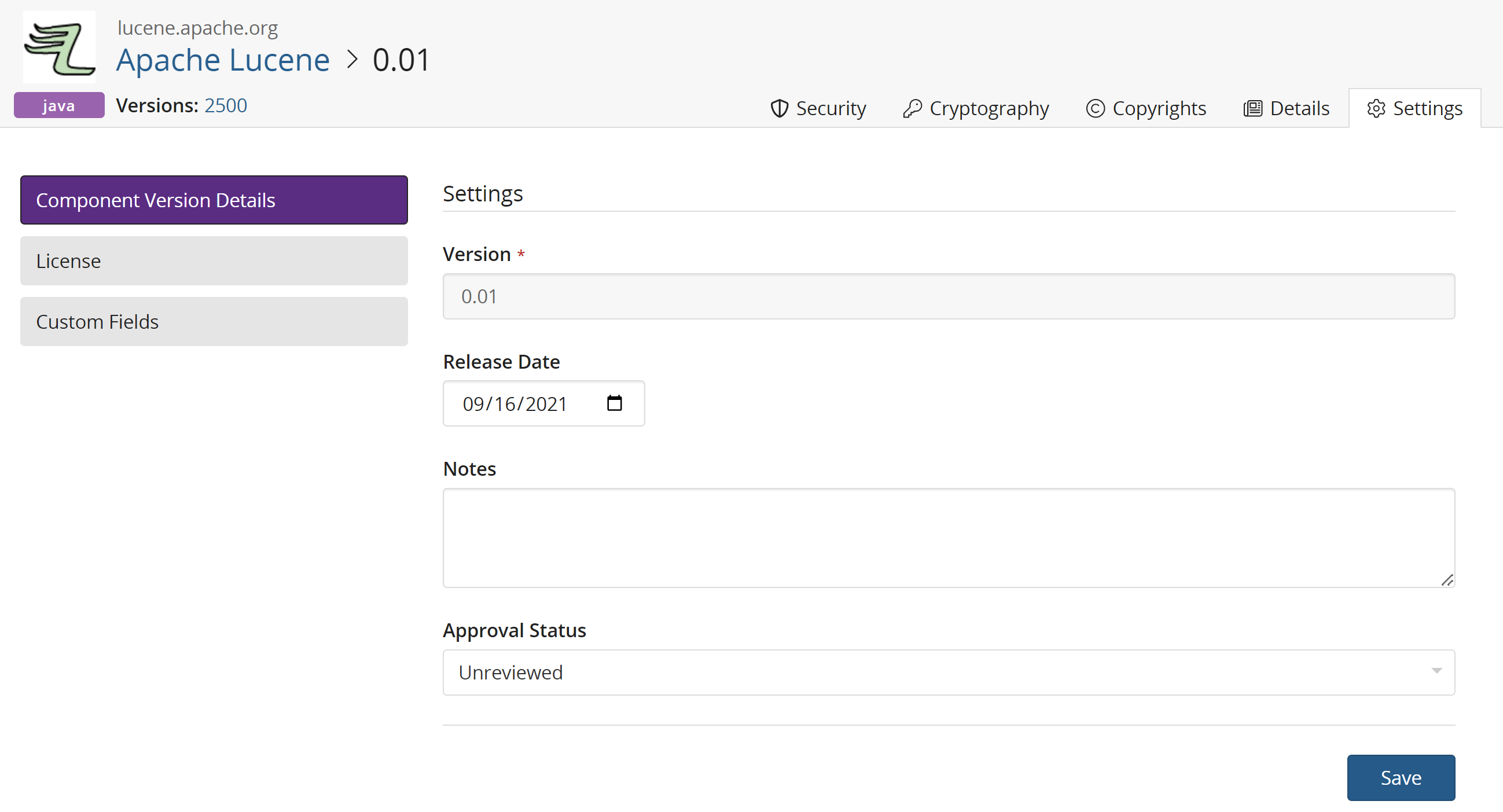
Users with the Component Manager role can use the Settings tab to edit information for this KB component version.
-
Select Component Version Details to edit the release date, notes, and status for this KB component version.
-
Select License to modify the existing license or add a new license or group.
-
Select Custom Fields to edit any custom values or properties set by the Custom Fields Administrator.
-
Select SBOM Fields to edit any SBOM values or properties set by the Custom Fields Administrator.
Click here for information on editing component information and here for information on modifying a component version's status.
Users with the System Administrator role can use the Settings tab to edit the component version custom field information, as shown in the Additional Fields section.